Epaper, Xorg and ChatGPT
A few months back I bought two Epaper displays from WeAct Studio. A 4.20” 400x300 black and white and 2.13” 250x122 black, white and red.
The intended project was to make Xorg video drivers for them and unlock the 42 years ecosystem of X11 applications.
Why would anyone want to write a video driver for X11 in 2026?
I’m a huge fan of the X11 design. A display server designed in the 1980’s and a graphical continuation of the UNIX philosophy of small terminals logging-in to bigger, more expensive and shared machines.
“I had a dedicated phone line (…) in my home that let me connect to the Unix systems at Murray Hill so I could work evenings and weekends.”
— Brian W. Kernighan, UNIX A History and a Memoir
The X11 core protocol is based around the ideas of limiting screen redraws and abstracting the inner workings of the remote display. X11 windows are portions of the screen separating concerns, exposures inform a client of the need of a partial redraw. Visuals, graphic contexts, allow applications to correctly adapt their rendering sequence to the remote display.
Epaper displays are limited in colors, and partial redraws are the norm. Because of the aforementioned reasons, and having programmed a bit for X11, I thought that creating a video driver would be a plug-and-play solution to unlocking a plethora of existing applications.
What’s the deal with ChatGPT?
Happens a moment in the life of any tech enthusiast, hobbyist, or professional, where the AI hype catches your curiosity. For anyone who have been in a cave for the last 5 years, the world has been in an unhinged frenzy over LLMs (Large Language Models). Big tech companies have been trying to mingle AI with our everyday life for a while now.
Being near the bring of this financial collapse, my curiosity finally peaked (really late I guess). For this small project I asked myself whether ChatGPT, OpenAI’s large language model, could be of any use.
And thus, far from vibe coding the entire project, I used it to answer questions about Xorg, and how to write drivers for it.
I am going to spoil ahead a bit. But I was flabbergasted how much dogshit it was.
Taming the Epaper display
The first step in every project is always to start rushing and
code crap as fast as possible look for the vendor documentation
and existing examples. WeAct Studio, the chinese vendor, has pretty
thorough examples, good-enough code, and english datasheets on their
github.
Having a WiringPi based example in their depot, I took an old Raspberry Pi 3 Model B v1.2 I had lying around and quickly had their example running. The example worked for both displays, even though all my future experimentations used the 4.20” one.
Then, I dissected the example code and made my own software library with vim in one hand and the datasheet in the other. Pretty crude, but the code was enough to perform a full refresh, requiring approximately 4.7s, and a partial whole screen refresh in 1.4s.
Until then, I didn’t need any help, but tested ChatGPT’s knowledge of the datasheet by asking it questions about the display. Immediately I couldn’t stand the whole spitting emojis everywhere and being too nice. I’m a human. It’s a machine. Why the hell do they have to make it seem sympathetic? That’s one of the worst human traits.
An angel makes itself look scary to ward off evil. A demon makes itself beautiful to deceive humans.
Anyway, It did make a few mistakes I don’t remember. No harm, no foul.
After hacking around the Doom Generic codebase, I quickly extended its fbdev backend to support slideshowing 1 frame every 1.4 second. A bit of luma conversion, a threshold so something shows on screen and a partial refresh later, I had a slideshow of Doom gameplay on my display.
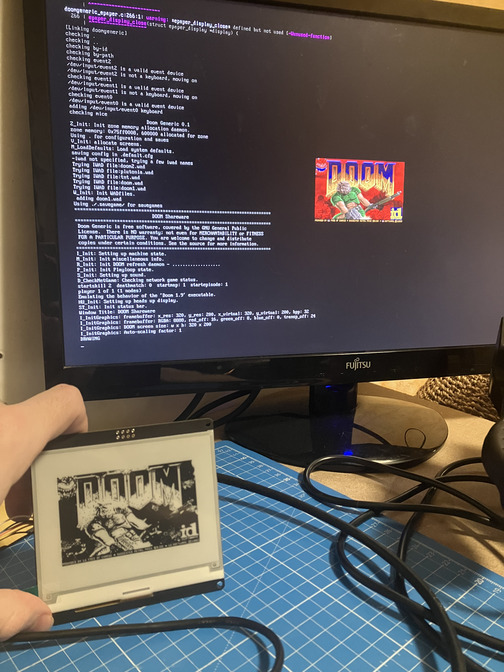
I was already a tad suspicious concerning these 1.4s. Don’t Epaper displays partial refreshes take around 300ms? ChatGPT and the datasheet assured me the display supported it, but the vendor code was a bit weird and wasn’t sending the same commands for this display it did for its other models (such as the 2.13” one). That’s where I started to have my doubts.
Enter the rabbit hole
This epaper is an electrophoretic display. One pixel state is changed by applying an electric field, changing the position of its particles in the fluid and thus the color of the underlying pixel. Sometimes, the transition is not perfect and some particles may stay in place, leading to a gray-scaled pixel. This phenomenon is called ghosting.
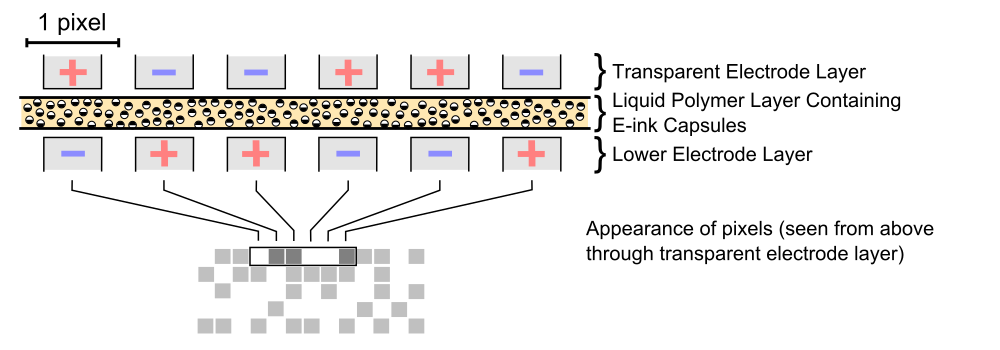
Whether or not the WeAct Studio displays support the red color, all their controllers expose two internal RAMs: A Black & White one, and a Red one. Obviously, for displays supporting red, the Red RAM is a bitmap of pixels appearing red. For monochrome displays, the Black & White RAM is a bitmap of pixels appearing white. What’s more interesting, is that the Red RAM is also used for monochrome displays.
For the rest of the discussion, just assume we talk about a monochrome display, as the red-colored displays may work differently.
During the execution of the display update sequence command, the controller will apply different voltages for each pixels according to the waveform setting.
In the waveform setting configured in the controller, the voltages are grouped in 4 main lookup tables: LUTBB, LUTWB, LUTBW and LUTWW. Now, you may have guessed it, the Red RAM is used to more accurately determine the pixels transitions, and thus, is used to save the previous values of the pixels. Avoiding transitions altogether for LUTBB and LUTWW, limiting aging.
epd_setpos(0, 0);
epd_write_reg(0x24); /* Writing black & white RAM. */
epd_write_imagedata(Image, Width * Height);

epd_update_partial(); /* Display Update inside. */

epd_setpos(0, 0);
epd_write_reg(0x26); /* Writing Red RAM. */
epd_write_imagedata(Image, Width * Height);
So, technically, the Red RAM copy can be dropped. It will just increase ghosting. A first optimization is unlocked, and the SPI copy of the whole screen is a rather expensive 193ms. Now, I said that voltages are applied, but the waveform settings goes further and applies them a precise number of times, to get rid of the most extreme ghostings artifacts. What if the reason we have 1.4s is the LUT having redundancies? Unfortunately, the vendor code doesn’t load a custom waveform setting for the 4.20” display. It is built-in the OTP memory of the display.
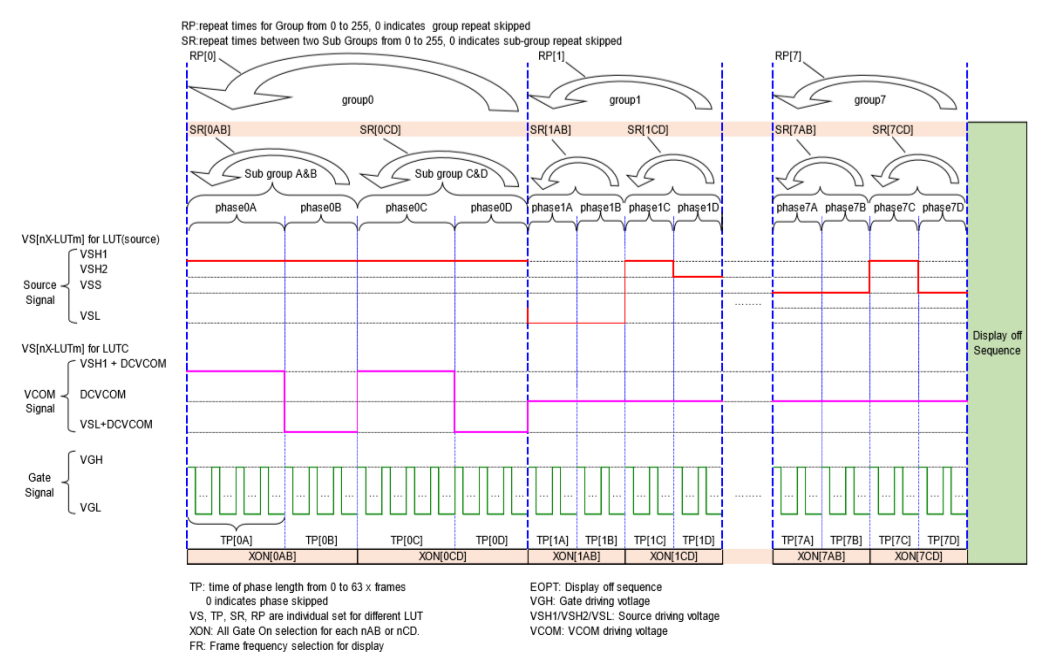
However, the example code provides a partial LUT for the other, smaller, displays.
I have two datasheets and a working LUT. So I did what every crazy person
determined engineer would do: I made my own LUT from it. I won’t go into too much details,
but the main difference between the two datasheets’ LUTs are the semantics of the SR
and RP fields shown in the above programmable driving waveform illustration.
From 1.4s the partial refresh of the screen was now down to only 675ms (counting-in the 193ms of B&W RAM copy). Still far from the promised ~300ms, but still a sensible optimization. Also, ghosting didn’t noticeably worsened, so that was a win too.
Xorg video driver
I could finally start the real project: a X11 video driver for the display. So I started to look for drivers writer’s guide/documentation in the official X.org documentation. There was also a xf86-video-dummy example video driver in the project’s sources. I started reading the DDX design, pretty extensive, pretty clear. And then went on studying the dummy example.
That’s where the real trouble began. The dummy driver had nothing in common with the DDX documentation’s snippets. Of course, it was initializing XRandR so I guess a few things had to differ. Asking ChatGPT, it tells me everything is fine, and I shouldn’t worry, the world is a beautiful place full of emojis and nice people.
As a first step I wanted to have an off-screen monochrome bitmap.
Which I could then periodically blit on my display later. So as the DDX
documentation mentioned, I looked for the xf1bpp module. It’s not there.
ChatGPT tells me to use the mfb module. Not there too. I tell ChatGPT
it hallucinated a module.
Oh my, you were right, the mfb module was deprecated in favor of fb. However, modern X servers have dropped support for monochrome bitmaps, so you will need to reimplement everything.
— ChatGPT, not exactly, but something similar.
So the dummy driver’s use of the fb module was the correct route from the start.
Not a good sign when a documentation references a module disabled
18 years ago.
So I read a bit about the fb module. It seems to be the swiss-army knife
replacing all previous *fb modules. It should be able to render a 1 bit
per pixel monochrome off-screen display. So why did ChatGPT say I needed to
reimplement everything?
You are indeed correct! The fb module was introduced to fit all requirements of framebuffer rendering, independant of depth and bits per pixels contraint.
— ChatGPT, still not an exact quote, as its obviously missing emojis
Not trusting a documentation dusty enough to
vote in my country,
I followed the server’s segmentation faults until I finally
had an offscreen rendering. Then, I added an OsTimerPtr,
to update the whole screen with the framebuffer every 500ms
(if the display wasn’t already busy). After fixing a bit
ordering issue during the framebuffer bit blit,
I had X11 applications running.
:mretx dah I ,ylesicerp eroM
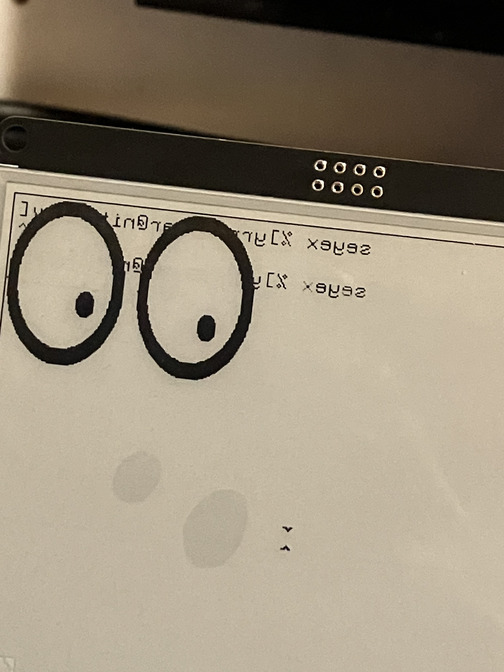
The documentation being of no help and the source code having absolutely no comments, I asked my worst friend ChatGPT for help.
This is expected as the fb layer uses fbBltOne to render bitmap fonts in opposition to fbBlt used in the other rendering paths. You need to configure imageByteOrder and bitmapBitOrder for it to work correctly.
— ChatGPT, or something like that
I think that’s one of the few times it actually impressed me.
I didn’t verify its assertion concerning fbBltOne and fbBlt.
Even though imageByteOrder had nothing to do with it,
the bitmapBitOrder was the correct fix for the issue.
It may have spared me a dozen minutes looking up the source
code to find the problem. So not amazing, but noticeable.
Finally, I dropped support for WiringPi. I made a low-level SPI abstraction. For the GPIOs, I went with gpiod, as it seemed to become the go-to standard for Linux.
Partial updates
It was now time to improve the driver and support partial updates.
Xorg has the Damage
module in its source code which registers regions where redraws are necessary.
Exactly what I needed to support partial updates. After the previous
bitmapBitOrder success, I asked ChatGPT to make a snippet of code using
this extension. It didn’t even compile. So long for vibe coding I guess.
I started looking in the source code of the Damage extension,
and see an undocumented enumeration DamageReportLevel. I ask the
cutting edge AI to give a description of each entry in the enum.
typedef enum _damageReportLevel {
    DamageReportRawRegion,
    DamageReportDeltaRegion,
    DamageReportBoundingBox,
    DamageReportNonEmpty,
    DamageReportNone
} DamageReportLevel;
Of the 5 entries, it described only 4. And I honestly think it hallucinated a description out of their names, as it basically spewed out what a stressed out intern would say if you pressed for an immediate answer.
Myself: You forgot DamageReportDeltaRegion.
ChatGPT: There is no DamageReportDeltaRegion in DamageReportLevel.
And you’re telling me that thing cost millions to make? No wonder this generation hasn’t solved nuclear fusion.
Having finally solved how this extension worked, no thanks to ChatGPT, it turned out that this display did not support partial updates correctly. I did not investigate the matter further, but using partial updates seem to bleed the Red-RAM buffer on the screen, outside of the expected updated region. So I was doomed to refresh the whole screen and keep my miserable 675ms.
Conclusion
Pretty disappointed by OpenAI’s leading product, I finished my project without it. It turns out the 18 years deprecated documentation was actually the most accurate source of informations. After reviewing the control flow and refactoring the video driver, I was satisfied with it. Except for Linux not supporting asynchronous SPI transfers from userspace, the driver is entirely asynchronous. The only blocking operation is the 193ms SPI transfer of the framebuffer done for each redraw. But with a 675ms refresh rate, input latency is not the major issue.
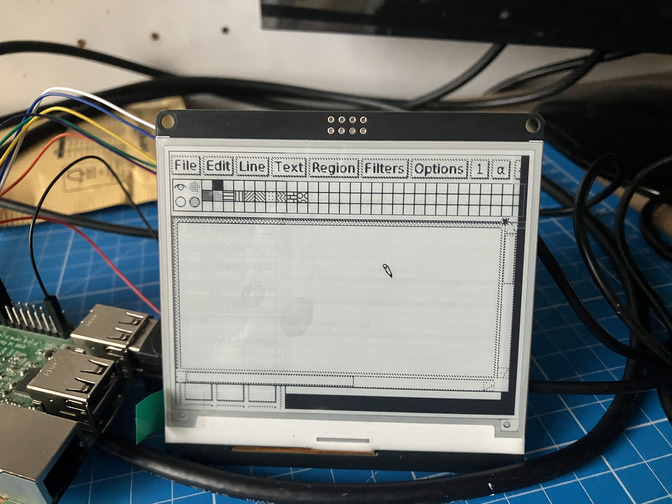
It turns out I was right, just writing the driver and exposing a StaticGray
visual with 1 bit per pixel was enough for XTerm, Xeyes, Xpaint and a few other
X11 applications to work out of the box. I wrote the driver in the hope others
would contribute and add support for more displays. So if you have a contribution,
the driver is MIT-licensed, and available on my github.
There is a lot of work to do, and maybe new modules to make (SPI, GPIO support as server modules?)
And maybe, in the future, a project doing a better
job on the codebase will accept the driver as a builtin contribution.
X11 still has a future, whatever the policy of big tech is dictating. It was well-designed, and good designs do not die easily. Remember, Xorg is maintained by the people who wants X11 dead. Wayland (2008) is now older than XFree86 (1991) was when it was created. And Wayland still hasn’t replaced X in our modern distributions.
And ChatGPT was disappointing to say the least.
I believe there are industrial applications for X11 over Epaper displays. I licensed the driver MIT, so feel free to prove me right without licensing fees.